Cost and rightsizing
A monthly estimate per namespace and per pod, and request recommendations from real usage that you can apply in one click.
Cluster → Cost has two modes, switched from the header: Costs and Rightsizing.
What you need
| Without it | With it | |
|---|---|---|
| metrics-server | Costs are computed from pod requests (100m and 128Mi where a pod has none). Rightsizing has no data. | Costs and rightsizing use live usage. |
| A Prometheus | Rightsizing works from a single snapshot of usage. | Rightsizing uses the 95th percentile over the last seven days. |
Costs
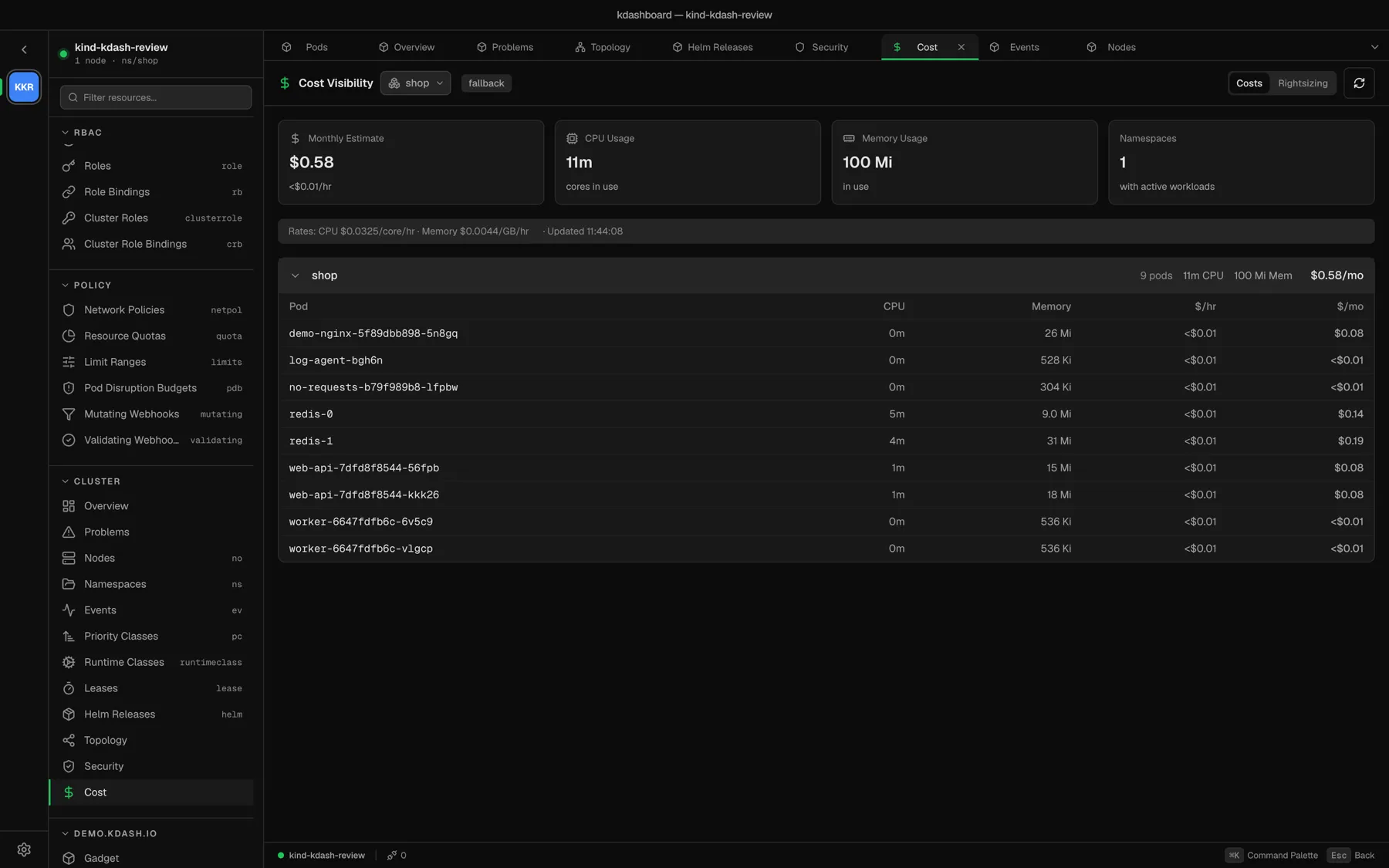
The tiles show the Monthly Estimate (and the hourly figure), CPU and memory in use, and the number of namespaces with workloads. Below, namespaces are listed from the most to the least expensive; expand one to see the cost of each pod.
All figures are in US dollars, and a month is 730 hours.
Where the rates come from
- kdashboard reads the instance type and region from the standard node labels, and works out the cloud provider — AWS, Azure or GCP — from them.
- It downloads the on-demand price list for that provider from the kdashboard releases on GitHub. No cluster data is sent. The list is cached on disk for 24 hours.
- The hourly price of a node is split 60 % to CPU and 40 % to memory, which gives a rate per core-hour and per GB-hour. The line under the tiles shows the rates in use.
The badge next to the title says how good the estimate is:
| Badge | Meaning |
|---|---|
cloud-pricing | Real on-demand prices for your instance types |
fallback | The provider or instance type was not recognised — bare metal, kind, minikube. Default rates apply: $0.0325 per core-hour and $0.0044 per GB-hour. |
requests | Default rates and no metrics-server, so usage is taken from requests |
Rates cannot be customised yet. Spot, reserved and committed-use discounts are not taken into account. To force a fresh price list, use Settings → Kubernetes → Cost Pricing → Refresh Pricing.
Rightsizing
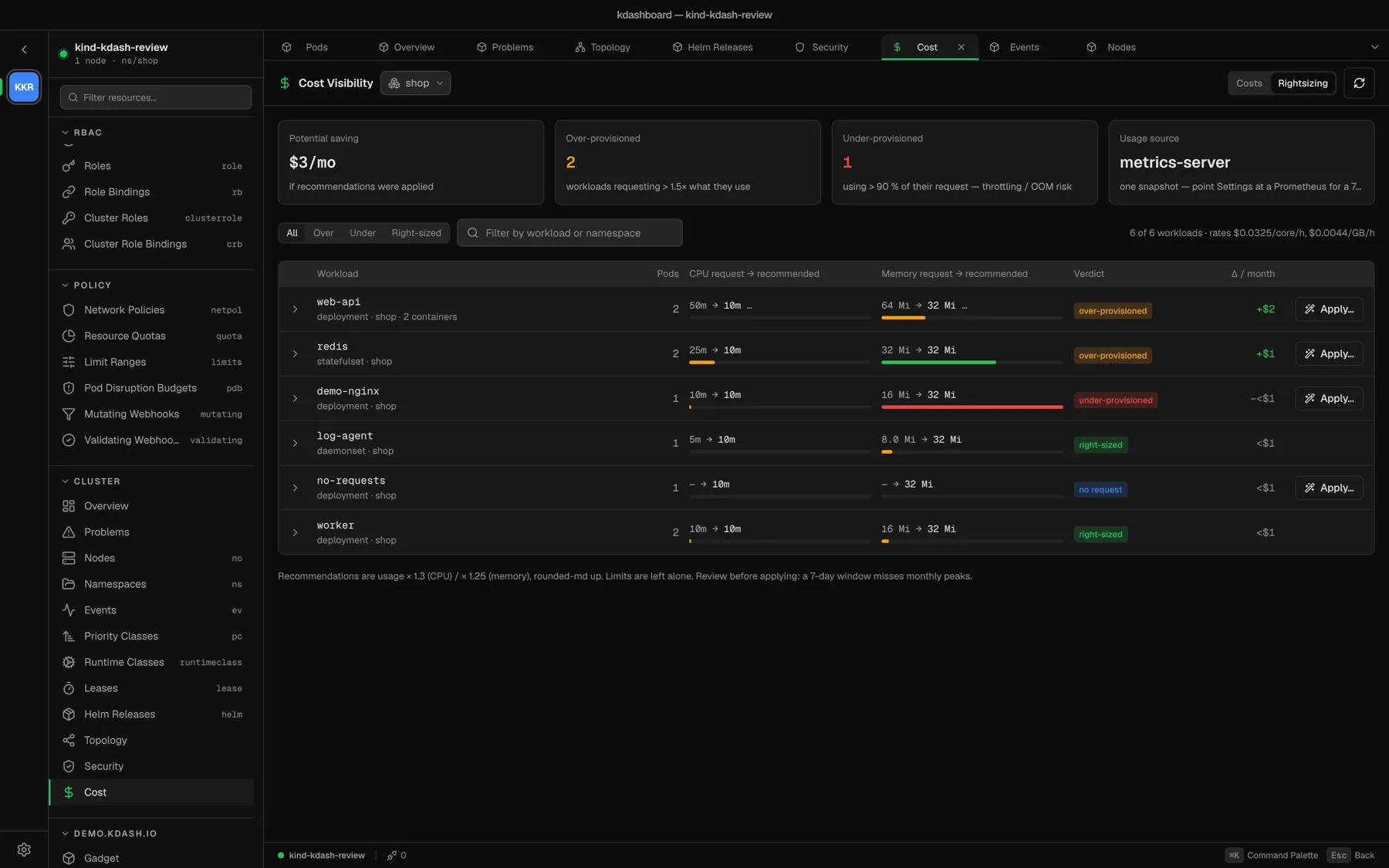
Rightsizing compares what each container requests with what it uses.
| Verdict | Meaning |
|---|---|
| over-provisioned | The request is more than 1.5 × the recommendation |
| under-provisioned | Usage is above 90 % of the request — a risk of CPU throttling or an OOM kill |
| right-sized | Neither |
| no request | The container sets no request |
| no data | No usage sample for it |
A workload takes the worst verdict of its containers. Usage is averaged over its running pods.
The recommendation is usage × 1.3 for CPU and × 1.25 for memory, rounded up to a tidy value, and never below 10m or 32Mi. Δ / month is what the change would save — or cost, for an under-provisioned workload — at the current rates, across all replicas. Filter with All, Over, Under, Right-sized, or by name. Expand a row for the numbers per container.
Apply a recommendation
- Click Apply… on a row.
- Read the manifest in the dialog. It contains only the requests that change, only for the containers that change.
- Click Apply. kdashboard sends it as a server-side apply, and the controller rolls the pods.
Good to know:
- Apply… is offered for Deployments, StatefulSets and DaemonSets.
- Limits are never touched — only requests.
- If the workload is managed by Helm, Argo CD or Flux, change the request at the source instead, or the next sync will undo it.
- Seven days of history miss a monthly peak. Review before you apply.